
Jackery F4 Error: Battery Overvoltage & How to Clear It (2026)
Jackery F4 means battery overvoltage. Why the fix is to discharge rather than charge, how it differs from F5, and what to do if F4 keeps returning.
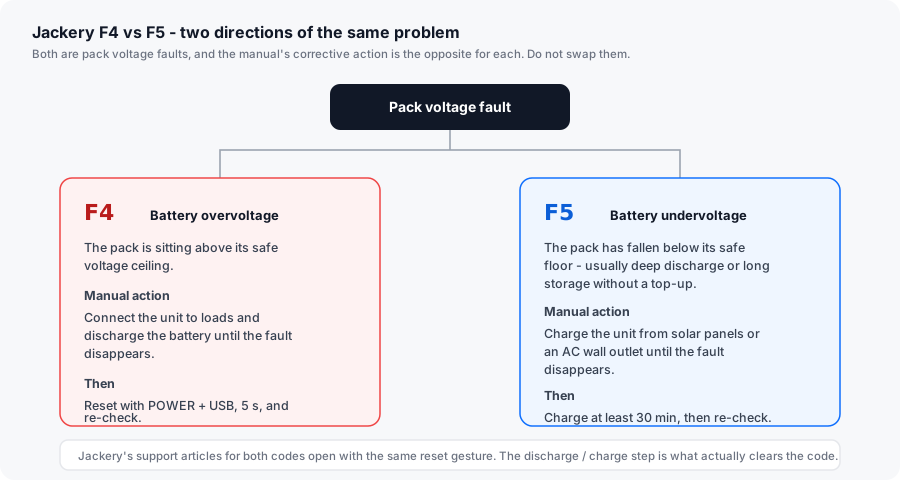
TL;DR: F4 is battery overvoltage — the pack is sitting above its safe voltage ceiling. The counter-intuitive part is the fix: Jackery’s manual says to connect the unit to loads and discharge the battery until the fault disappears. Do not put an F4 unit on the charger. This is the exact opposite of F5, and confusing the two is the most common reason an owner spends an afternoon getting nowhere.
How this page is sourced: the corrective action is quoted from the Explorer 1500 / 2000 Pro manual table, and the reset gesture from Jackery’s F4 help-centre articles. We do not hold these units on a bench, so nothing here is presented as our own measurement.
What F4 actually means
The manual’s F4 entry is battery overvoltage. In practice this appears in one of two very different situations, and telling them apart determines how much of your day this takes:
Situation one — a real overvoltage event, usually on the input side. Something pushed the pack above its ceiling. The likely suspects are a solar array whose cold-morning open-circuit voltage exceeds the unit’s DC input rating, or a charging source with poor voltage regulation. This is the situation the protection exists for.
Situation two — a false or transient reading. Pack voltage drifts, the BMS reads a boundary condition, and F4 appears without any genuine overcharge. This clears on a discharge-and-recharge cycle without any hardware being at fault.
How to clear F4
Clear a Jackery F4 battery overvoltage error
-
Unplug the charging source first
Disconnect the AC charging cable and the solar input before doing anything else. If a charging source is what pushed the pack over its ceiling, leaving it connected keeps re-raising the fault.
-
Put the unit on a load and let it discharge
This is the manual's corrective action, stated plainly: connect the product to loads and discharge its battery until the fault disappears. A small, steady load is fine - a lamp or a laptop charger on the AC output. You are pulling the pack back under its ceiling, so keep the load modest rather than heavy.
-
Watch for the fault to clear on its own
The manual's wording is that the fault disappears during discharge - you are not necessarily looking for a reset gesture at this stage. If the display clears while the load is running, the pack is back in range.
-
Reset, then re-check
If the code is still latched after discharging, hold POWER and USB together for 5 seconds on most Explorer units; Pro-series models hold DISPLAY and USB for 10 seconds and show 8888 on success. Jackery's help-centre article for F4 lists the standard reset - and one variant simply advises restarting the unit.
-
Charge back up on a known-good source
Once F4 has cleared, recharge on mains rather than solar for the first cycle. That removes the input-side suspect from the equation and confirms the pack will accept charge normally again.
-
Investigate the input if F4 returns on solar
F4 recurring specifically during solar charging points at array voltage. Measure the open-circuit voltage at the panel end and check it against the manual's 60 V maximum DC input, measured cold rather than warm. Our solar compatibility guide covers the arithmetic.
F4 versus F5, side by side
| F4 | F5 | |
|---|---|---|
| Manual name | Battery overvoltage | Battery undervoltage |
| What happened | Pack above its ceiling | Pack below its floor |
| Manual corrective action | Discharge until the fault disappears | Charge until the fault disappears |
| Charge it? | No | Yes - 30 minutes minimum on mains |
| Likely trigger | Array or charging source out of spec; pack voltage drift | Deep discharge; long storage while flat |
| Escalate if | It returns in cool conditions with no input connected | It returns immediately after a full charge |
Why it happens
| Cause | Fixable by you? | Notes |
|---|---|---|
| Solar array Voc above the DC input limit | Yes | The manual’s ceiling is 60 V. Check it cold, not warm. |
| Charging source with poor voltage regulation | Yes | A generator with unstable output is a common culprit. Switch to mains. |
| Pack voltage drift giving a boundary reading | Yes | A discharge-and-recharge cycle usually resets it. |
| Charging in very cold conditions | Yes | Cold alters cell voltages. Warm the unit to room temperature first. |
| BMS voltage-sense fault | No | Warranty case if F4 returns repeatedly with no charging source connected. |
Is this a replacement-part situation?
No. As with F5, there is nothing to replace and nothing to buy. The pack is not user-serviceable in Explorer units, and Jackery does not sell BMS or pack modules to consumers. F4 is resolved by discharging the pack, and if it keeps returning the answer is a warranty claim rather than a part.
Jackery’s standard cover on Explorer power stations is 36 months, extended to 5 years on most models when the product is registered. Cover applies to purchases through Jackery’s own site, Jackery-branded third-party stores or authorised dealers, and the receipt establishes the warranty start date.
Related reading
- Jackery Error Codes F0–F9 — the full table, with the manual’s own wording.
- Jackery F5 (battery undervoltage) — the opposite code, with the opposite fix.
- Jackery F3 (BMS or battery failure) — when a battery code survives a full cycle.
- Solar panel compatibility guide — the Voc maths behind input-side overvoltage faults.