
Jackery F5 Error: Battery Undervoltage & How to Fix (2026)
Jackery F5 means battery undervoltage. Why deep discharge and long storage cause it, how to charge it back to life, and how to stop it recurring.
TL;DR: F5 is battery undervoltage. The pack has fallen below its safe floor, and the two causes are the obvious ones: discharging it flat, and storing it flat for months. The manual’s corrective action is to charge the unit from solar panels or an AC wall outlet until the fault disappears, and Jackery’s support article adds a minimum of 30 minutes of charging on a standard household socket before you judge whether the code has cleared. The mistake that wastes a whole afternoon is resetting repeatedly without charging — a reset only clears the flag, it does not put energy back in the pack.
How this page is sourced: the corrective action is quoted from the Explorer 1500 / 2000 Pro manual table; the 30-minute charge step and the reset gesture are quoted from Jackery’s F5 help-centre articles. We do not hold these units on a bench, so nothing here is presented as our own measurement.
What F5 actually means
Jackery’s manual gives F5 a two-word definition — battery undervoltage — and it sits in the battery/BMS group alongside F3 (BMS or battery failure) and F4 (battery overvoltage). It is the mirror image of F4, and the fix is the opposite: F4 wants you to discharge, F5 wants you to charge.
The reason this code exists at all is protective. Lithium packs should not sit at very low voltage; the BMS is refusing to let the pack go further, and it will also refuse to let the unit run outputs until the pack is back above its floor.
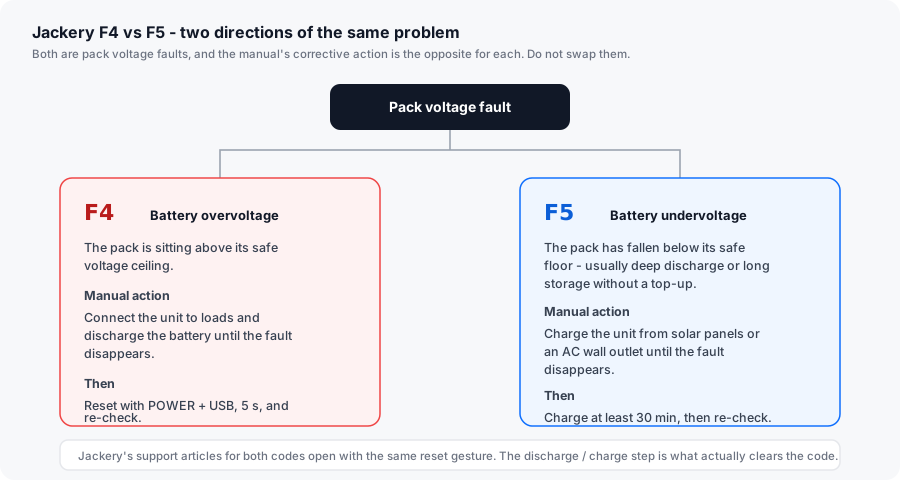
How to clear F5
Clear a Jackery F5 battery undervoltage error
-
Plug in to mains, not to a load
Jackery's manual gives two charging routes for F5 - solar panels or an AC wall outlet. Mains is faster and more predictable, so start there. A standard household socket, not a power strip already carrying heavy loads.
-
Charge for at least 30 minutes before judging it
Jackery's F5 article specifies a minimum of 30 minutes charging on a household socket, then re-check whether the unit behaves normally. If the pack was deeply discharged, the display may wake partway through rather than immediately - a blank screen for the first few minutes is not a fault.
-
Reset after charging, not before
Hold POWER and USB together for 5 seconds on most Explorer units; Pro-series models use DISPLAY and USB for 10 seconds and show 8888. Resetting before the pack has any energy in it just re-raises F5.
-
Charge to full, then leave it there
The manual's wording is to keep charging until the fault disappears. Letting the pack reach 100 percent on the AC charger gives the BMS a complete top-balance pass, which is the step that clears a drifted state-of-charge estimate.
-
If the display never wakes, try solar
For a pack that will not respond to mains charging, Jackery's alternative route is solar input. Low-current solar charging can coax a deeply discharged pack up to the point where the mains charger will engage. Give it time rather than wattage.
-
Escalate if F5 returns after a full charge
An F5 that reappears immediately after a completed full charge points to the pack or the BMS rather than to your usage. That is a warranty matter - see our Jackery F3 page for the escalation path, since the two codes share the same root and the same outcome.
Why it happens
| Cause | Fixable by you? | Notes |
|---|---|---|
| Ran outputs until the low-SOC cutoff and left it there | Yes | Charge to full. This is the ordinary case. |
| Stored flat for months | Yes | The classic F5 cause. Jackery’s storage guidance exists precisely to prevent it. |
| Repeatedly resetting instead of charging | Yes | The most common wasted effort. A reset clears the flag, not the deficit. |
| Very cold conditions | Yes | Lithium packs lose usable voltage in the cold. Warm the unit to room temperature first, then charge. |
| Aged or degraded pack | No | Warranty case. Capacity loss plus recurring F5 is the signature. |
| BMS fault misreporting pack voltage | No | Warranty case. |
The storage rules that stop F5 coming back
Jackery’s own storage guidance in the manuals is specific, and F5 is the code it is designed to prevent. The pattern to follow:
- Store at 60-80 percent, not flat and not full. Storing flat is what produces F5; storing at 100 percent accelerates calendar ageing.
- Recharge every three months. Jackery recommends checking and recharging the unit every three months when it is in storage.
- Run a full charge and discharge cycle every 6 to 12 months. This keeps the state-of-charge estimate honest.
- Store somewhere dry and temperate. The manual’s own figures: -20 °C to 45 °C for up to a month, 0 °C to 45 °C for up to three months, 0 °C to 25 °C for up to twelve months.
- Do not leave it discharged for 3-6 months. The manual states plainly that a unit stored discharged for that long may become unchargeable — which is F5 hardening into something worse.
If you are putting a unit away for a season, the sequence is: discharge to roughly half, top it to about 70 percent, then diarise a recharge three months out.
Is this a replacement-part situation?
No. There is no part to buy and no part to replace — the pack in an Explorer is not user-serviceable, and opening the unit voids the warranty. F5 is resolved by putting energy back into the battery and, if it recurs, by claiming on the warranty.
Jackery’s standard cover on Explorer power stations is 36 months, extended to 5 years on most models if the product is registered after purchase. Cover depends on buying through Jackery’s own site, Jackery-branded third-party stores or authorised local dealers, and the receipt establishes the start date.
Related reading
- Jackery Error Codes F0–F9 — the full table, with the manual’s own wording.
- Jackery F4 (battery overvoltage) — the opposite code, and why you must not apply this fix to it.
- Jackery F3 (BMS or battery failure) — what to do when a battery code survives a full charge cycle.
- Jackery Explorer charging problems — for a unit that will not charge and shows no code at all.