
Jackery Error Codes F0-F9: Official Meanings & Fixes (2026)
Every Jackery Explorer fault code from F0 to F9, with the meaning printed in Jackery's own manuals, the official reset gestures, and what each code actually needs.
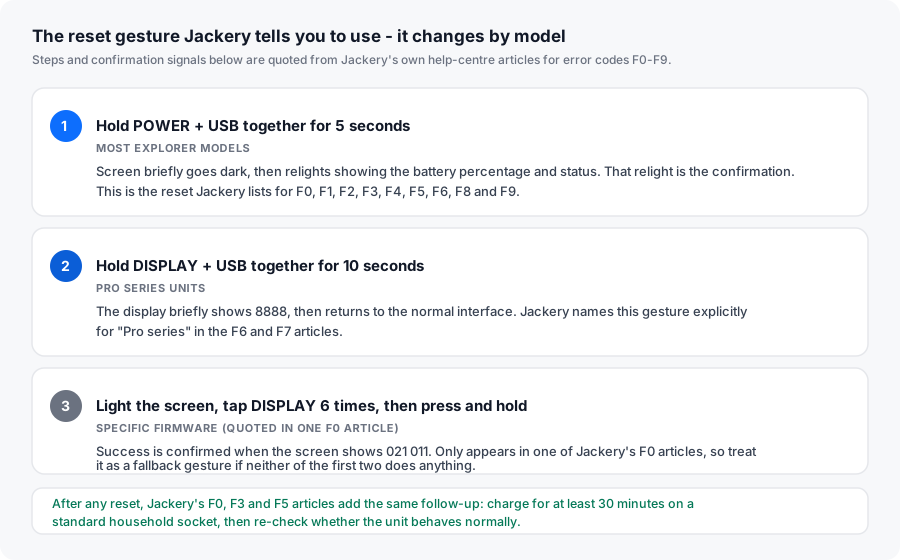
TL;DR: Jackery Explorer units use a single fault-code family, F0 through F9. The code names are printed in every Jackery user manual, but the manual labels its own descriptions “For Internal Fault Maintenance Only” — which is why owners end up hunting through forums. Only two codes, F6 and F9, are designed to clear without a support ticket; F7 clears itself when sunlight returns; the rest point to an internal fault. The reset gesture differs by model: POWER + USB for 5 seconds on most Explorers, DISPLAY + USB for 10 seconds on Pro-series units (the display shows 8888 when it works).
This page is a compiled reference. We do not own or disassemble Jackery units and we have not put any of these codes on a test bench — every meaning below is quoted from Jackery’s published user manuals, and every recovery step is quoted from Jackery’s own help-centre articles, with the source named next to it.
Why Jackery error codes are hard to look up
Three things make this harder than it should be:
- The manual tells you to call support. In the Explorer 600, Explorer 1000 Pro and Explorer 3000 Pro manuals, the entire F0–F9 table is headed “Description (For Internal Fault Maintenance Only)” and the instruction is to contact after-sales for almost every code. The Explorer 1500 and Explorer 2000 Pro manuals are the exception — they print real corrective actions.
- The codes are split across two documents. The meaning of a code lives in the printed manual. The recovery gesture lives on Jackery’s support site. Neither document links to the other.
- Third-party lists contradict the manual. We found popular “Jackery error code list” pages that publish
E01,E02,E03,E10,E11— codes that appear in no Jackery manual. Others publish F-codes with the wrong meaning entirely. Details in the myth section below.
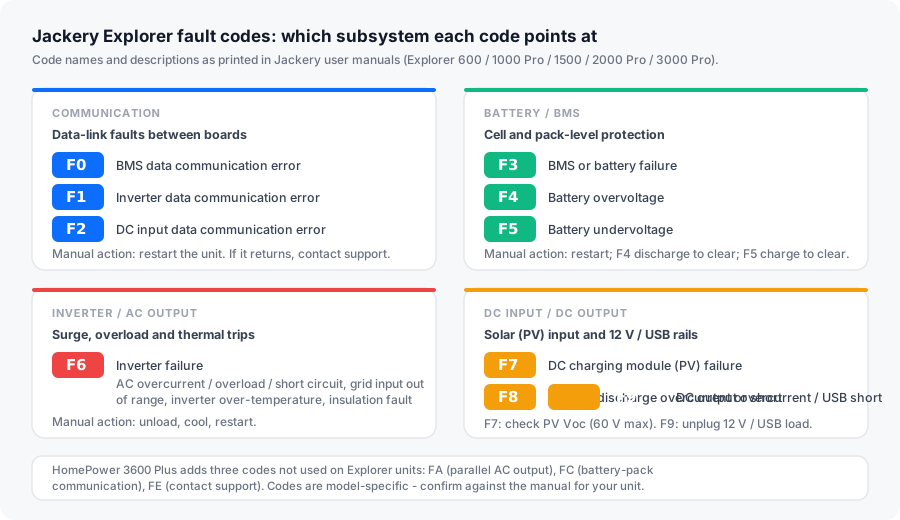
The complete Jackery F0–F9 code table
Every code below is used across the Explorer line. “Manual” is the corrective action printed in the Explorer 1500 / 2000 Pro troubleshooting table; “Support” is what Jackery’s own help-centre article for that code tells you to do.
| Code | Name (from Jackery manual) | What it points at | Manual action | Can you clear it yourself? |
|---|---|---|---|---|
| F0 | BMS Data Communication Error | Data link between the BMS and the mainboard has failed | Restart the unit | Reset, then charge 30+ min |
| F1 | Inverter Data Communication Error | Data link between the inverter and the mainboard has failed | Restart the unit | Reset |
| F2 | DC Input Data Communication Error | Data link between the DC charging module and the BMS has failed | Restart the unit | Reset |
| F3 | BMS or Battery Failure | The battery management system or the pack itself | Restart the unit | Reset + 30 min charge, then warranty |
| F4 | Battery Overvoltage | Pack voltage is above its safe ceiling | Discharge until the fault clears | Discharge, then reset |
| F5 | Battery Undervoltage | Pack voltage has fallen below its safe floor | Charge until the fault clears | Charge 30+ min, then reset |
| F6 | Inverter Failure | AC overcurrent, overload or short circuit; grid input out of range; inverter over-temperature; insulation fault | Unload, ventilate, restart | Yes — unplug load, cool ~2 h, reset |
| F7 | DC Charging Module (PV) Failure | PV input overvoltage, DC charging module over-temperature, or its output overcurrent protection | Remove DC input, check Voc, restart | Yes — usually clears when sunlight returns |
| F8 | Battery Charging / Discharging Overcurrent / Short Circuit | BMS overcurrent or short-circuit protection has triggered | Contact Jackery Customer Support | Reset; escalate if it returns |
| F9 | DC Output Overcurrent / Short Circuit | USB short-circuit protection has triggered | Remove the 12 V / USB load | Yes — unplug the device, reset |
On “which code is most common”: Jackery does not publish fault frequency data, and any site that ranks these codes by “most common” is guessing. The closest public signal is documentation depth — Jackery wrote multi-branch help articles only for F6 (three scenarios), F7 (solar-specific) and F9 (separated by port), which tells you those are the ones generating enough tickets to document in detail. We link each of those to a dedicated page below.
The reset gesture changes by model
This is the single most useful thing on this page, and it is the part most third-party guides get wrong. Jackery publishes three reset gestures, and which one applies depends on your unit.
Reset a Jackery Explorer to clear a fault code
-
Note the code first
Write down the code on the display before you clear it. Jackery's support team asks which code appeared and what was connected at the time, so a photo of the screen saves a round trip.
-
Disconnect everything
Unplug the AC charging cable, the solar input, and every device on the AC, USB and 12 V outputs. A reset performed under load will not clear the fault flag reliably.
-
Choose the gesture for your model
Most Explorer units: hold POWER and USB together for 5 seconds. Pro-series units: hold DISPLAY and USB together for 10 seconds. Success looks like the screen going dark and then relighting with the battery percentage (or briefly showing 8888 on Pro units).
-
Follow the code-specific step
A reset only clears the flag. F4 needs the pack discharged, F5 and F3 need a 30-minute charge on mains, F6 needs roughly two hours of cool-down, F7 needs sunlight or a check of your array voltage, and F9 needs the device on the offending port unplugged.
-
Re-test in isolation
Plug in one device, on its own, and watch the display. Codes that return with a specific appliance are load problems; codes that return with nothing connected are hardware faults.
What each code needs, one by one
Jump straight to the code on your display. Codes with a dedicated page are linked in the heading.
F0 — BMS Data Communication Error
The mainboard has lost its data link with the battery management system. Jackery’s F0 articles give two variants of the same advice: reset the unit, then charge it for at least 30 minutes on a standard household socket and check whether normal operation returns. One F0 article lists an additional gesture for particular firmware — light the screen, tap DISPLAY six times, then press and hold until the display shows 021 011.
F1 — Inverter Data Communication Error
The mainboard has lost its data link with the inverter board. Jackery treats this as usually transient: its F1 articles describe it as possibly a one-off and ask for the standard reset gesture. No 30-minute charge step is specified for F1.
F2 — DC Input Data Communication Error
The DC charging module has lost its link with the BMS. Same family as F0 and F1, same official answer: reset and see whether it stays away.
F3 — BMS or Battery Failure
The manual’s label is blunt: BMS or battery failure. There is no field repair. Jackery’s F3 article pairs the standard reset with a 30-minute charge, after which the escalation path is a warranty claim. Jackery’s standard cover on Explorer power stations is 36 months, extended to 5 years on most models if you register the product. Full escalation path on our Jackery F3 page.
F4 — Battery Overvoltage
The pack is above its voltage ceiling. The manual’s corrective action is the opposite of F5: connect the unit to loads and discharge the battery until the fault disappears. Do not charge an F4 unit hoping it clears. Compared side by side with F5 on our Jackery F4 page.
F5 — Battery Undervoltage
The pack has fallen below its floor — the classic result of deep discharge or of storing the unit flat for months. The manual says charge it from solar panels or an AC wall outlet until the fault disappears; the help-centre article adds the 30-minute minimum. Our Jackery F5 page covers the charging route and the storage rules that prevent a repeat.
F6 — Inverter Failure
The busiest code in Jackery’s support library, and the one where the manual and the help centre disagree. The manual lists five steps including grid voltage and 30 cm of vent clearance. The help centre tells you to unplug the AC load, let the unit rest about two hours to cool fully, then reset; if F6 appeared while charging, it asks you to check that mains voltage is above 200 V and to cool for about four hours. Because F6 has the most self-service depth, it has its own page: Jackery F6 troubleshooting.
F7 — DC Charging Module (PV) Failure
F7 almost always arrives during solar charging, and Jackery’s own articles treat sunlight as the first suspect rather than the hardware. Weak light drops the panel voltage below what the charger needs, which raises F7; charging resumes by itself once the sun is back. The manual adds the hard limit owners should know: 60 V maximum DC input. Panels in series can exceed that on a cold, bright morning. Work through Jackery F7.
F8 — Battery Charging / Discharging Overcurrent or Short Circuit
BMS overcurrent or short-circuit protection has tripped. The manual’s action is unambiguous: contact Jackery Customer Support. The help-centre article still offers the standard reset as a first step, which is worth doing before you open a ticket.
F9 — DC Output Overcurrent / Short Circuit
A DC output fault — in practice, the USB or 12 V rail. This is the second code designed to self-clear: remove the load and it recovers. Jackery splits its guidance by port, and for the car socket it quotes a fixed rating of 12 V / 10 A / 120 W maximum. It also flags non-original cables as a cause of failed USB charging. See Jackery F9.
Two ways online code lists mislead you
The E-code lists are not Jackery codes. Several high-ranking pages publish tables of E01, E02, E03, E05, E10, E11, E12 with meanings attached. None of those codes appears in any Jackery user manual we could find, and no Jackery help-centre article uses an E-prefix. Jackery’s system is F0–F9 only. If your display shows something starting with E on a Jackery, treat the online table as unverified.
Some F-code meanings online are simply wrong. One widely shared list describes F1 as overload protection, F2 as a charging-input issue, F3 as a battery temperature fault and F4 as an overcharged battery. Against the actual manual text, F1 and F2 are data communication faults, not power faults — and battery temperature on Jackery is not an F-code at all, it is a thermometer icon that appears with no number.
That last point deserves its own line, because it causes real alarm:
- Solid thermometer icon — the unit is too hot to charge or discharge. Move it out of the sun, let it cool, and it clears itself. Not a fault code.
- Hollow thermometer icon — too cold. Let it return to room temperature. Not a fault code.
- Low battery indicator — steadies below 20%, flashes below 5%. Working as designed.
Codes that only exist on other Jackery products
If you have a HomePower 3600 Plus or 3600 Max, your manual adds three codes that Explorer units do not use:
| Code | Meaning | Action |
|---|---|---|
| FA | Parallel AC output fault | Turn off AC output on both units, then press AC on each unit again within 1 minute |
| FC | Battery-pack communication fault | Restart the battery packs and the host separately; if it persists, disconnect and reconnect the pack |
| FE | Unspecified internal fault | Contact Jackery Customer Support |
If your unit shows an F-code outside F0–F9 and it is not one of these three, contact Jackery with a photo of the display rather than acting on a forum reading.
Reset did not work — now what?
Work down this list before you escalate, and keep notes. Support will ask for exactly this information.
- Confirm the code is real and current. Unplug everything, let the unit sit for ten minutes, and see whether the code returns with no load attached.
- Rule out temperature. A unit that was in a hot car or a freezing garage can raise a fault that is entirely environmental. Bring it to room temperature first.
- Rule out the input. For F7, that means the array voltage and the sunlight. For F6 during charging, that means confirming mains voltage is comfortably above 200 V.
- Rule out the load. Reconnect one appliance at a time. Codes tied to a specific appliance are a load problem, not a unit problem.
- Document it. Serial number (under the flap or on the bottom), a photo of the code on the display, and the purchase receipt. Jackery’s warranty is tied to the original purchase.
If the code survives all five, stop cycling the unit and open a support case. Repeatedly resetting a unit with a genuine BMS fault does not fix it and may deepen the fault.
When to stop using the unit entirely
Some symptoms are not codes at all, and they outrank everything above:
- Any swelling of the housing. Stop charging, move the unit outside, away from buildings, and open a claim.
- Burning, plastic or chemical smell, especially alongside an F3 or F8.
- Housing temperature above 60 °C (140 °F) measured with no load connected.
An F3 that returns after a reset and a full charge cycle is also a stop sign — the pack protection cannot be trusted at that point.
Related Jackery troubleshooting
- Jackery Troubleshooting: Fix Any Explorer Model Fast — the model-by-model index.
- Jackery Explorer Charging Problems — when it will not charge but shows no code.
- Solar panel compatibility — the Voc and Isc maths behind most F7 events.