
EcoFlow RIVER 3 Charging Test: 0–100% in 53 Minutes, Heat and Noise Measured
We logged a full 0–100% charge curve, a 3–100% repeat run, thermal readings, and 50cm noise levels on our EcoFlow RIVER 3. Real numbers, both sessions, no averages.
Short version: our EcoFlow RIVER 3 (model EFR705, 245.76Wh) went from 0% to a full charge in about 53 minutes, and a second controlled run from 3% to 100% finished in 51 minutes. Wall power sat between roughly 295W and 307W for most of the charge, the vent area peaked at 38.8°C in the repeat run (48.4°C in the first), and 50cm noise readings stayed between 37.4 and 43.7dBA against a 36dBA room background. A fully dead unit recovered normally the moment we plugged in AC — no reset, no special button combo.
This article is the deep dive behind those numbers: the full minute-by-minute curve, both thermal sessions, the noise log, and what happened when the battery was run to 0%. For the complete picture of the unit, start with our EcoFlow RIVER 3 review.
Our test setup and an important disclosure
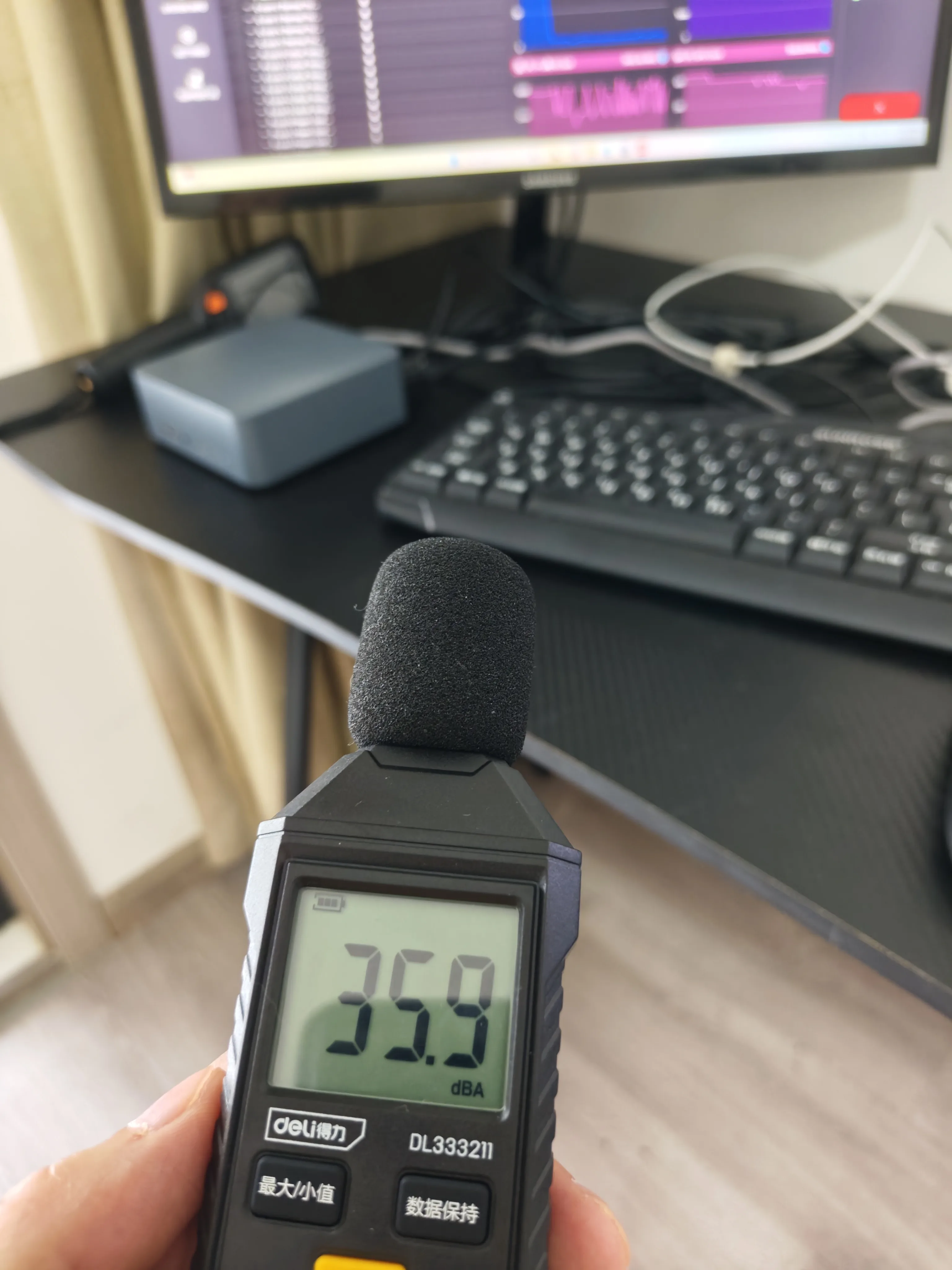
All charging data in this article comes from one physical unit that we bought and tested ourselves. We measured wall-side input power with a plug-in power meter, logged enclosure temperatures with a thermal camera at about 50cm, and recorded sound with a class-2 style sound level meter at 50cm.
Test conditions:
| Item | Detail |
|---|---|
| Unit | EcoFlow RIVER 3, model EFR705, 245.76Wh (19.2V, 12.8Ah) |
| Room temperature | About 29°C |
| Noise measurement distance | 50cm |
| Thermal camera distance | About 50cm |
| Room background noise | 36dBA |
| AC input rating (nameplate) | 220–240V~, 50/60Hz, max 3A |
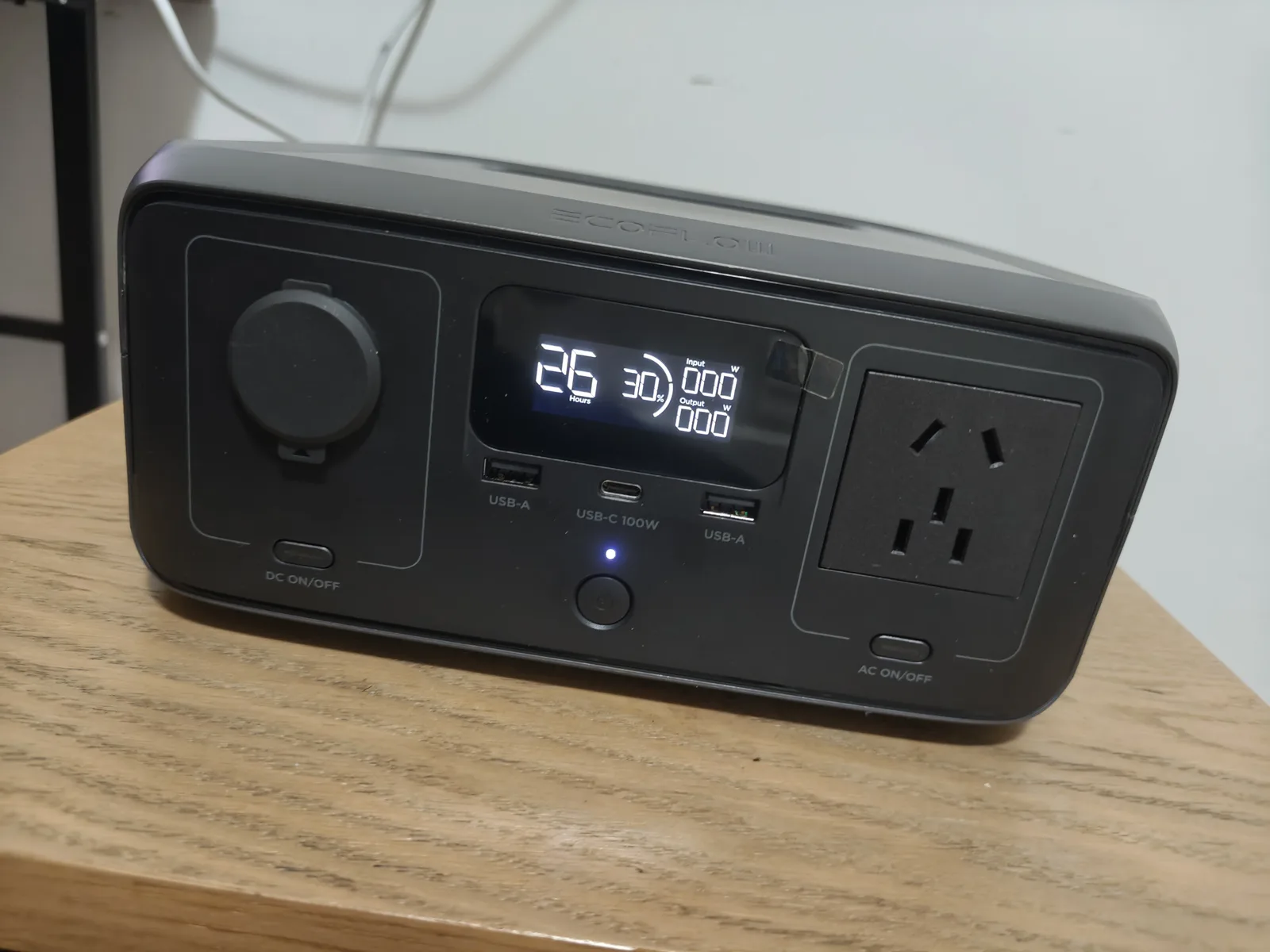
Disclosure: our unit is the China-market 220–240V version with a 10ms UPS specification on the nameplate. The US RIVER 3 is a 120V product. The battery pack (245.76Wh) and the ~300W charge behavior should carry over, but wall-side specifics — plug type, mains voltage, and exact UPS claims — differ by region. Do not treat our AC and UPS findings as a direct certification of the US version. We explain how the mix-up happened in our RIVER 3 vs RIVER 3 Plus comparison.
The full 0–100% charging curve
We started from a fully depleted battery (0%) and logged input power and state of charge every few minutes:
| Time | Battery | AC input (wall side) | Fan |
|---|---|---|---|
| 0 min | 0% | 281W | not recorded |
| 5 min | 9% | 297W | not recorded |
| 10 min | 19% | 302W | running |
| 15 min | 28% | 304W | running |
| 20 min | 37% | 304W | running |
| 30 min | 57% | 306W | running |
| 40 min | 76% | 305W | running |
| 50 min | 94% | 303W | running |
| 53 min | 100% | 0W | running |
| 57 min | 100% | 0W | stopped |
Three things stand out from this curve:
- There is almost no taper until the very end. Input power stays between 297W and 306W from the 5-minute mark all the way to the 50-minute mark. Most power stations start stepping down the current much earlier.
- The final 6% takes about 3 minutes. Going from 94% at 50 minutes to a displayed 100% at 53 minutes is an unusually short top-off phase for a lithium battery — most of the balancing work clearly happens at low current after the display flips to full.
- The fan keeps running for about 4 minutes after the charge completes, then stops on its own. If you charge overnight next to a bed, the noise window is effectively the charge hour plus a few minutes.
Second-charge verification: 3% to 100% in 51 minutes
One curve can be a fluke, so we repeated the test. After running the unit down to 3% (where it shut itself off) and letting it sit for roughly 12 hours, we recharged it:
- 3% to 100% took 51 minutes, within 2 minutes of the first run’s 53.
- Wall input ran at about 304–307W for most of the session, dropped to roughly 215W at 91%, and read 0W when the display showed 100%.
- Peak recorded input was 307W.
- Maximum temperature was 38.8°C near the fan/vent area; 50cm noise readings ranged 37.4–38.5dBA.
- About 4 minutes after reaching 100%, the fan stopped. No alerts or faults appeared in either session.
The repeat run is the more controlled of the two (it started from a defined 3% state after a long rest), and it confirms the headline: on a 220–240V wall circuit, this unit reliably charges from empty to full in about 50–55 minutes.
Heat: what gets warm, and how much
Fast charging at ~300W into a 245.76Wh pack is an aggressive charge rate (more than 1C), so heat is the number to watch. Our thermal camera showed two distinct hotspots depending on the session:
Heat is also what trips EcoFlow’s E01 temperature fault on the larger Delta units — if your Delta Max is throwing that code mid-charge, our Delta Max E01 temperature error fix guide covers the causes, safe cooldown steps, and when it needs service.
First full run (0–100%):
| Phase | Hottest reading | Location |
|---|---|---|
| Off / charge start | 30.6°C | USB panel |
| 10 min | 38.9°C | USB panel |
| 20 min | 38.2°C | fan vent |
| 30 min | 41.8°C | fan vent |
| 50 min | 48.4°C | fan vent |
| Just after full | 45.5°C | fan vent |
| 5 min after full | 43.0°C | bottom |
Repeat run (3–100%): peak of 38.8°C at the fan/vent.
Why the difference? The first session started from a fully depleted battery that had just finished a 135-minute 100W-class discharge, so the unit began charging already warm. The repeat run started from a rested, cooler state. We report both numbers rather than blending them into one tidy average: starting temperature, ambient conditions, and measurement timing genuinely change the peak. The honest summary is that the vent area typically lands in the high-30s to high-40s °C during a full-charge session at 29°C room temperature — warm to the touch, but well within LiFePO4 charging norms and with no throttling or shutdown behavior observed.
Noise: what fast charging sounds like
The cooling fan is the only meaningful noise source during charging. At 50cm with a 36dBA room background:
| Phase | Noise at 50cm | Fan |
|---|---|---|
| Room background | 36.0dBA | off |
| 1 min into charge | 37.6dBA | not started |
| 10 min | 43.7dBA | just started |
| 15 min | 42.4dBA | running |
| 30 min | 38.9dBA | running |
| 50 min | 40.2dBA | running |
| At full (53 min) | 37.4dBA | running |
| 4 min after full | 34.7dBA | stopped |
The 43.7dBA peak is comparable to a quiet library — audible in a silent room, easy to ignore in anything busier. The post-charge 34.7dBA reading came in below our recorded background, which likely reflects background fluctuation rather than the unit making negative noise; we note it for completeness.
Practical translation: you will hear the fan during fast charging if the unit is on your desk, but the exposure is short. Charging during the day or in a living area is a non-issue; charging beside a sleeping person is the one scenario where we would pick a different time.
Fully dead at 0%: what happens when you plug in
Because we deliberately ran the battery to its cutoff, we got to document the dead-battery recovery. The sequence, taken from our continuous recording:
- With the unit at 0% and off, a short press of the power button lit the screen about 5 seconds into the video; the screen auto-locked about 10.5 seconds later and the unit shut down again.
- We plugged in AC around the 13-second mark. The display came back about 4.5 seconds after plugging in, and wall power jumped from 0W to roughly 271W immediately.
- The display showed 0% for about 16.5 seconds, ticked to 1% at 34 seconds, and reached 3% by 1 minute 28 seconds.
No special reset was needed. Plugging into AC was enough — no button combo, no app intervention, no error code. If your RIVER 3 ever reads empty and refuses to respond, connect wall power first and give it a minute before assuming a fault. For deeper no-power issues, see our power station not charging troubleshooting guide and the EcoFlow error codes list.
Wall energy vs stored energy: the efficiency picture
Two measured (not guessed) data points frame the efficiency question:
- Charging input, estimated: segment-by-segment wall power multiplied by time gives an estimated ~248Wh drawn from the wall for the 3–100% session. This is an estimate from logged values — we did not capture a cumulative kWh start/end delta for that specific run — so treat it as indicative, not a lab figure.
- Usable output, estimated: in our discharge tests, the unit delivered an estimated 202.5Wh over AC (about 270W load for 45 minutes, 82.4% of nominal) and an estimated 216.8Wh over USB-C at a 100W-class load (88.2% of nominal). The full discharge methodology is in our USB-C 100W test.
Putting those together: roughly 248Wh in, roughly 200–217Wh out depending on the port used. That implies a realistic round-trip efficiency in the 80–87% range before accounting for the unit’s own standby overhead — normal for a small power station with an always-on display and inverter, but worth knowing when you size a backup: a 245.76Wh spec sheet number is not 245.76Wh of deliverable AC energy.
What this means if you’re buying
- Charging speed is a genuine selling point of the RIVER 3. An hour from empty — twice verified — puts it among the fastest-charging small power stations we have handled.
- Heat is managed, not eliminated. Expect high-30s to high-40s °C at the vent during a full charge in a ~29°C room, with no throttling observed.
- The fan is audible but brief. 43.7dBA worst-case at 50cm for under an hour.
- Dead-battery recovery is foolproof on our unit: plug in, wait a few seconds, charging resumes.
- The wall-to-output efficiency is around 80–87%, so plan usable energy, not nameplate energy.
- The app controls are worth five minutes on day one. Charge limits, Device Timeout, and AC Timeout shape how the unit behaves with small loads — our RIVER 3 app guide walks through them.
All of the above applies to the 220–240V EFR705 we tested. US-model wall-input behavior should be similar in shape (EcoFlow rates fast AC charging for the US RIVER 3 as well), but we have not verified a US unit — treat the specific wattages as China-market results.