
EcoFlow USB-C Not Fast Charging? 5 Causes We Tested on the RIVER 3 (Cable, 5V Drops, Fixes)
Why an EcoFlow USB-C port sticks at 5V or caps at 60W: we reproduced slow-charging causes on a RIVER 3 with a USB meter, then fixed each one. Real test data inside.
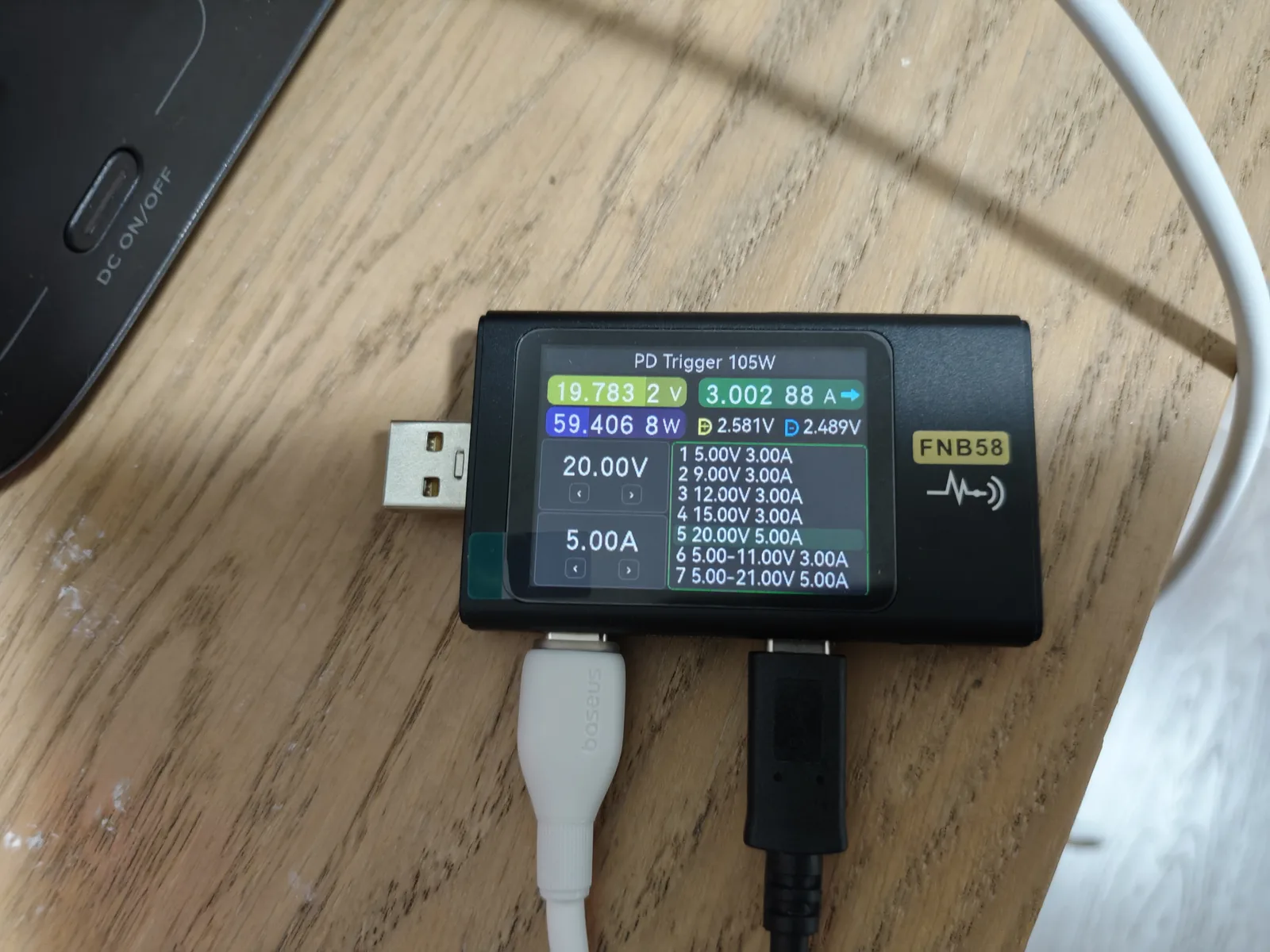
Short version: in our testing, an EcoFlow USB-C port that “isn’t charging” or charges slowly is almost never a broken port. We reproduced the three most common slow-charging symptoms on an EcoFlow RIVER 3 — a 60W cap instead of 100W, a port that silently falls back to 5V mid-session, and a phone that refuses to fast-charge — and all three traced back to the cable, the test chain, or proprietary phone protocols, not to the power station. With a proper 5A E-Marker USB-C cable, the same port exposed a 20V/5A PD profile and held a 100W-class load at about 97.6W for 15 minutes.
Below is the cause-by-cause diagnosis we ran, with the actual meter readings, so you can match your symptom to the fix before assuming the unit is faulty.
Symptoms we reproduced (and what each one means)
During our EcoFlow RIVER 3 USB-C test series we hit every one of these in person:
- The port charges, but only at 5V — a laptop or phone that should pull 60–100W trickles along at 5–15W.
- The port caps at about 60W even though the station advertises 100W over USB-C.
- The connection renegotiates mid-session — a meter in the chain suddenly drops from 20V back to 5V when another cable is plugged in downstream.
- A specific phone never fast-charges from the port, while every other device does.
Each symptom has a different cause. Here is how we isolated them.
First, what the port actually advertises
Before diagnosing, you need a baseline. The RIVER 3’s nameplate (model EFR705, the China-market 220V unit we tested) specifies USB-C output at 5/9/12/15V up to 3A and 20V up to 5A — a maximum of 100W.
We confirmed this with an FNB58 USB tester. The protocol detection screen reported PD 3.0 with 7 PDOs, labeled 63W total, plus QC2.0/QC3.0, AFC 9V/12V, FCP, SCP up to 24W, and Apple 5V/2.4A support:
| PD profile reported by the meter | Detail |
|---|---|
| Fixed PDOs | 5V / 9V / 12V / 15V at 3A, 20V at 3A |
| PPS | 5–11V at 3A and 5–21V at 3A |
| Fast-charge protocols | AFC, FCP, SCP (up to 24W), QC2.0, QC3.0 |
| Not supported | VOOC / DASH / WARP / SuperVOOC — the meter read “NONE” |
Two details in that table drive most “my EcoFlow USB-C is broken” complaints, so keep them in mind for the causes below.
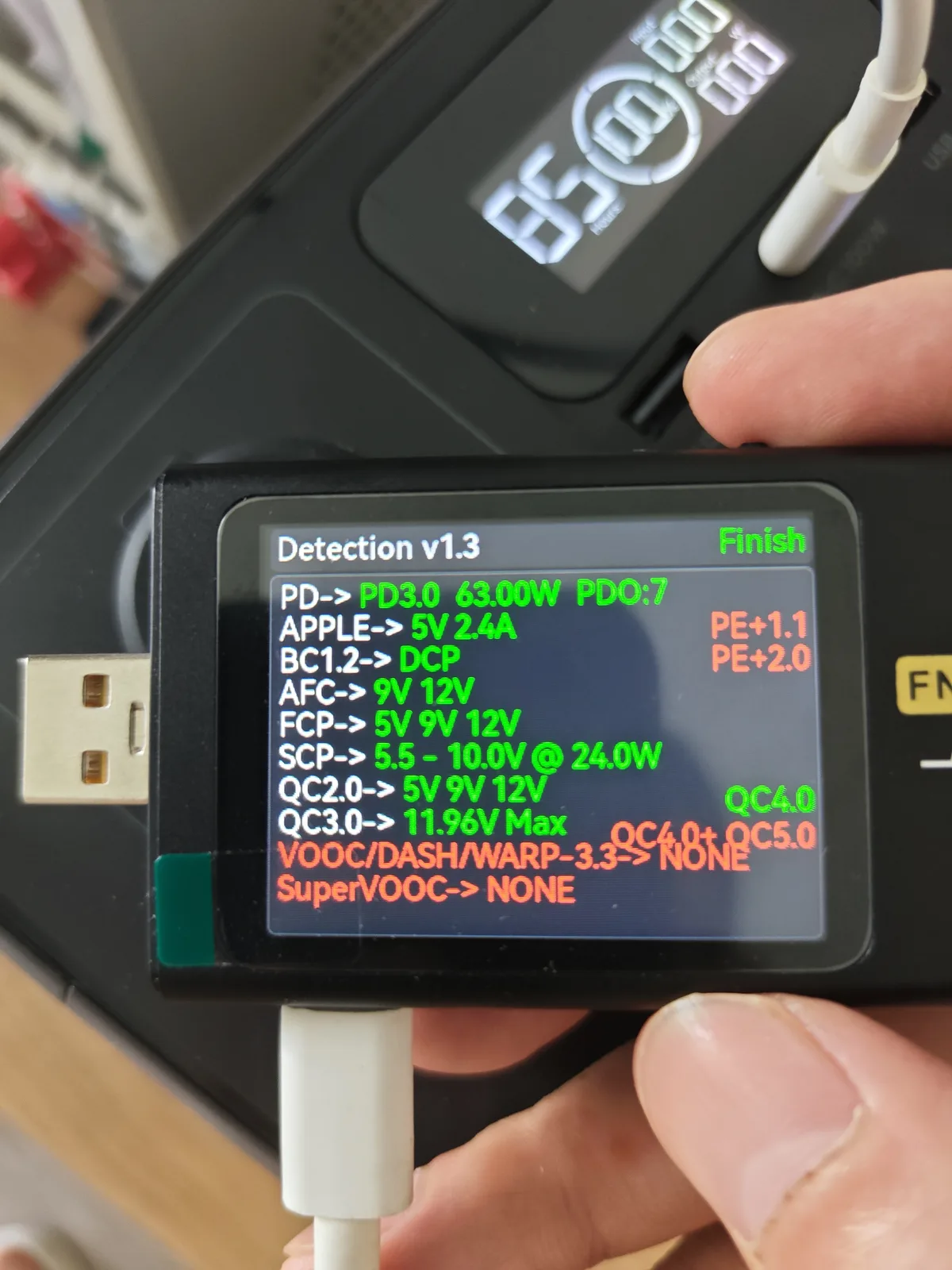
The protocol detection pass on our RIVER 3: PD 3.0 with 7 PDOs (63W with a 3A-rated cable in the chain), broad QC/AFC/FCP/SCP support, and no VOOC-family protocols. Your phone’s brand decides whether that last line matters.
Cause 1: the cable silently caps you at 60W
This is the single most common cause of “EcoFlow USB-C not charging fast.”
USB-C PD at 20V and up to 5A requires a cable with a 5A rating (an E-Marker chip inside). A cable rated only at 3A negotiates a maximum of 20V/3A — which is about 60W, no matter what the port can do.
We hit this during testing: with one C-to-C cable, the meter only ever exposed 20V/3A, so the whole setup was practically limited to about 60W. The station was fine the entire time.
How to confirm: swap in a cable explicitly sold as “100W” or “5A” and retest. In our case, the moment a 5A E-Marker cable went in, the port exposed the 20V/5A profile and we could pull real 100W-class loads — about 97.62W to 97.68W at the meter, stable for 15 minutes.
How to check a cable without a tester: look for “5A” or “100W” or “240W” printed on the connector or packaging. If the cable came bundled with a phone or a small gadget, assume 3A until proven otherwise.
Cause 2: the connection falls back to 5V mid-session
The strangest symptom we reproduced: while a 60W-class load was running through our meter chain, plugging in a downstream cable caused the negotiation to renegotiate all the way back to 5V. Output collapsed from about 60W to a few watts until we intervened.
This is a chain-level compatibility behavior — the meter, adapters, or the order in which cables were connected confused the negotiation — not a missing 100W PDO on the power station. After re-seating the chain with the 5A cable as the first hop out of the station, the port triggered correctly again.
How to confirm: if you use a USB meter, trigger board, or hub between the station and your device, simplify the chain to station → one known-good 5A cable → device. If the problem disappears, one of the middle pieces was renegotiating the profile down.
If you don’t use any adapter: a persistent 5V-only result directly from the station can also come from a worn or dirty USB-C port — inspect for lint and play in the connector before blaming the electronics.
Cause 3: your phone wants a proprietary protocol the port doesn’t speak
The protocol table above is the answer to “my phone charges slowly from the EcoFlow but fast from its own charger.”
If your phone is a OnePlus, Oppo, or Realme (VOOC/SuperVOOC family), our meter read NONE for those protocols on the RIVER 3. The phone will fall back to generic PD or QC profiles — typically 5V or 9V — which the port supports, so it will charge, just not at the proprietary flagship speeds. Huawei (SCP) devices do get a real middle ground: the port advertises SCP up to about 24W.
This is not an EcoFlow defect; it is how USB-C fast-charge ecosystems fragment. Samsung, iPhone, and Pixel users are largely unaffected because those devices fast-charge over standard PD/PPS, which the port provides.
Cause 4: you’re reading the port’s rating, not the device’s request
A related misunderstanding: the USB-C port’s 100W maximum is a ceiling, not a promise. The meter showed the port correctly stepping through 9V, 15V, and 20V profiles depending on what the connected device requested. A device that asks for 15V/3A (45W) is supposed to get 45W.
So before concluding “not charging properly,” check what your device actually requests. A phone that tops out at 27W will never show more than 27W from this port, and that is correct behavior.
Cause 5: when it might actually be the station
We did not reproduce a genuine hardware fault during our test series, so we can’t give you first-hand failure numbers here — treat this section as a checklist, not test data. Signs that point away from the cable and toward the unit:
- The port delivers no power at all, with any cable, to any device, while the AC outlets work.
- The screen shows an error code or the port area feels abnormally hot at light load. Our healthy unit peaked at 35.2°C on the USB panel during a sustained 60W load and 42.3°C during the 100W-class discharge — anything dramatically hotter at low load is worth a support ticket.
- The port worked consistently before and changed behavior after a firmware update or a physical event (drop, liquid, bent connector).
If you see error codes, work through them with our EcoFlow error codes decoder, and if the unit won’t power on at all, start with the RIVER 2 won’t turn on guide — the recovery logic transfers. Beyond that, EcoFlow’s official support channel and warranty terms are the right path; check the official spec sheet for your region because port configurations differ between the 220V and 120V versions.
The fix checklist, in order
Work down this list — it is the exact sequence we used to get from “60W cap” to a verified 100W-class port:
- Swap to a certified 5A / 100W USB-C cable (eliminates the 60W cap).
- Remove any hub, meter, or adapter from the chain (eliminates 5V renegotiation).
- Re-seat the cable at both ends and check the port for lint.
- Test with a second device — if the second device fast-charges, the port is fine and your first device wants a proprietary protocol.
- If everything above fails, note the exact behavior (voltage on a meter if you have one) and contact EcoFlow support.
After applying steps 1–2, our recheck showed the trigger mode reading about 19.78V / 3.00A (roughly 59W, a normal 60W-class stage) with the full PDO list including 20V/5A available again — and in the full test series the same setup sustained about 97.6W and delivered an estimated 216.8Wh over a complete 100W-class discharge (about 135 minutes to shutdown).
The recheck after rebuilding the chain with a 5A cable: the meter triggers at about 19.78V / 3.00A (a normal 60W-class stage) and the PDO list shows the 20V/5A profile available again.
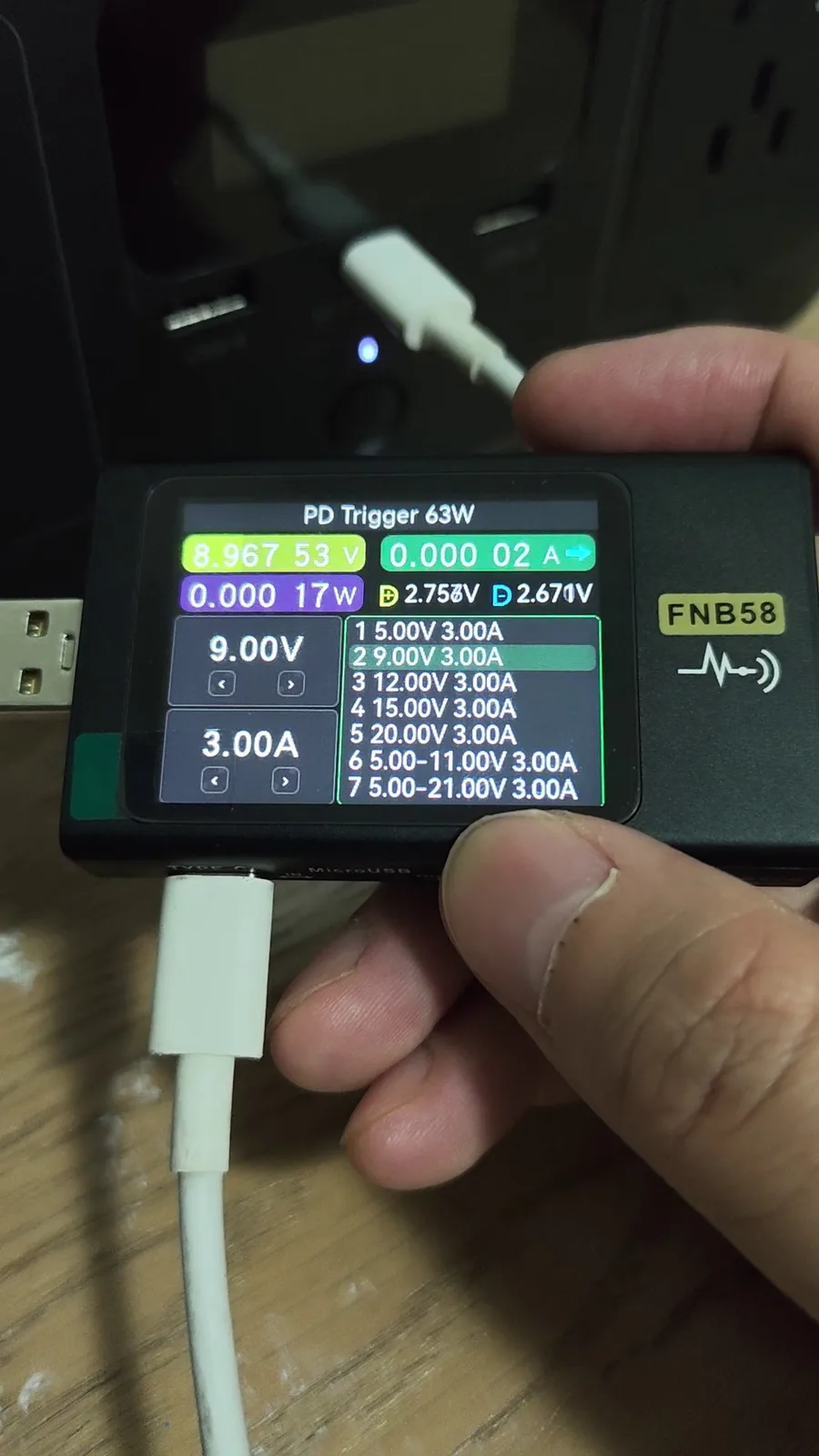
Trigger-mode detail from our test video: the meter walks the port’s full PDO/PPS list. This is the reference view to compare against when your own meter shows something missing.
What this means for RIVER 3 buyers
The port itself is honest: the nameplate says 100W, and with a 5A E-Marker cable we measured a real 100W-class output, a stable 60W stage for over 40 minutes with the USB panel never exceeding 35.2°C, and roughly 88% of the battery’s rated capacity delivered through USB-C in our full-discharge estimate. Every “slow USB-C” symptom we could reproduce was caused by the cable, the chain, or the phone’s protocol — all fixable for the price of one good cable.
Want the full numbers? Read our EcoFlow RIVER 3 USB-C 100W test, the full RIVER 3 review, and our charging speed and temperature test. To sanity-check charging times for your own setup, the solar recharge time calculator accounts for real-world input losses.